How can we help?
Setup guides, answers and contacts for your lab-in-a-box — from first connection to certified results in SpectacularCloud.
Browse by topic
Everything you need to install, run and manage SpectacularOne.
Connect to Wi-Fi
Join your site’s network from the touchscreen — Secured, Open and web sign-in networks.
Open guideRun a test
Sample, cartridge, results: the three-step SpectacularOne workflow.
See workflowCartridges & safety
Sealed, room-temperature-stable cartridges with automatic sterilization.
Cartridge factsSpectacularCloud
Live results, CoAs on demand, analytics and LIMS/ERP integration.
Cloud basicsCompliance & validation
ISO 17025, HACCP & FSMA alignment and AOAC validation status.
StandardsPlans & account
Lease terms, cartridge plans and enterprise options.
Account infoConnect your instrument to WiFi
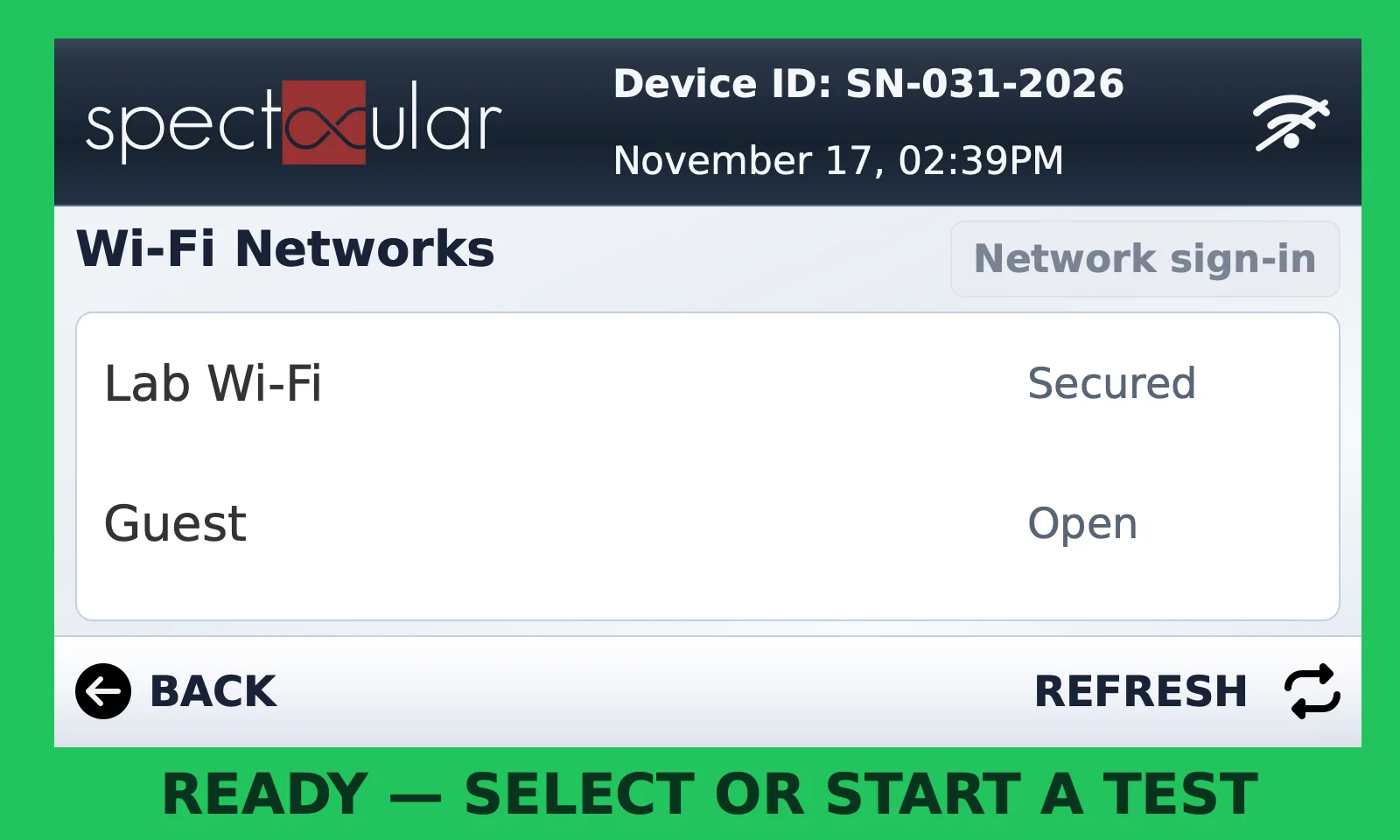
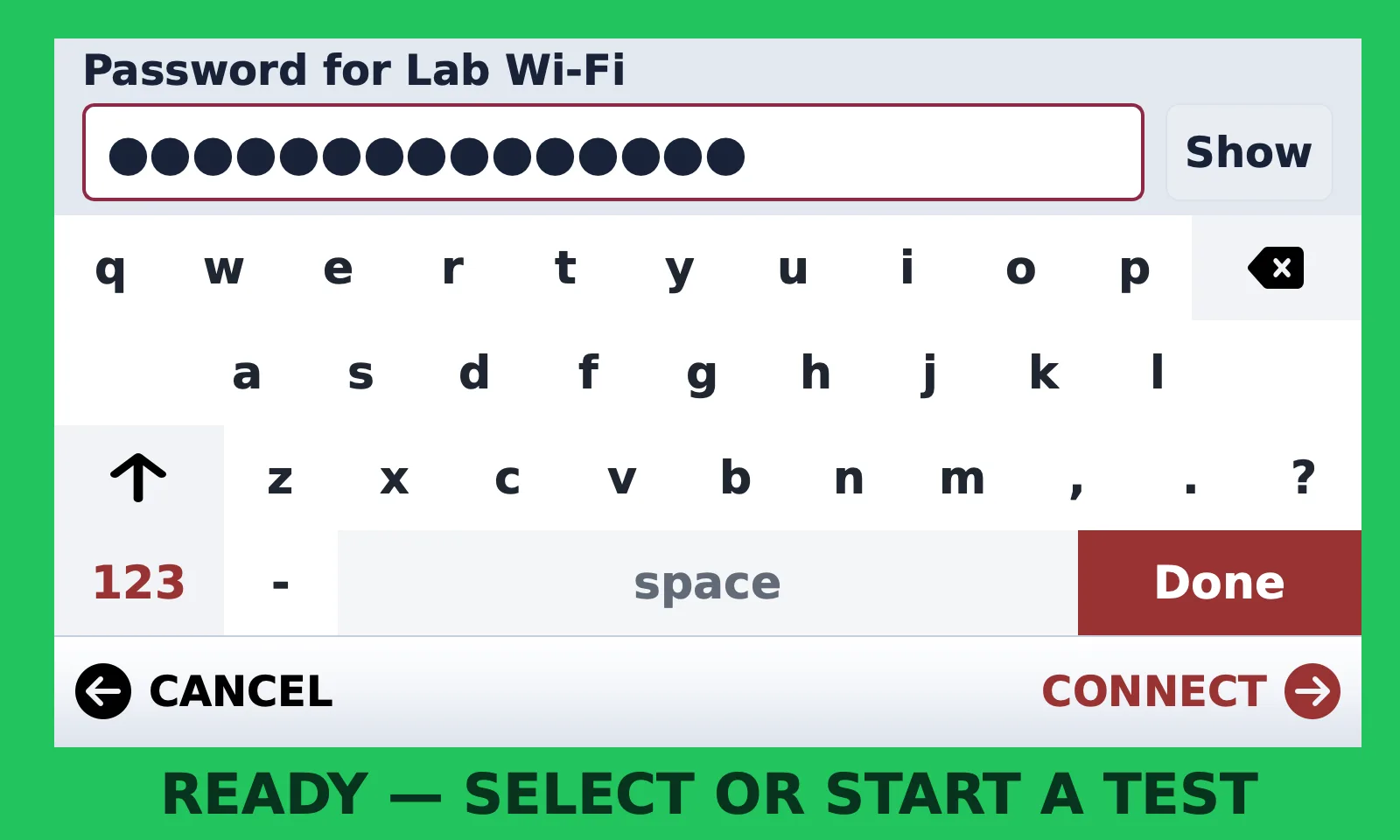
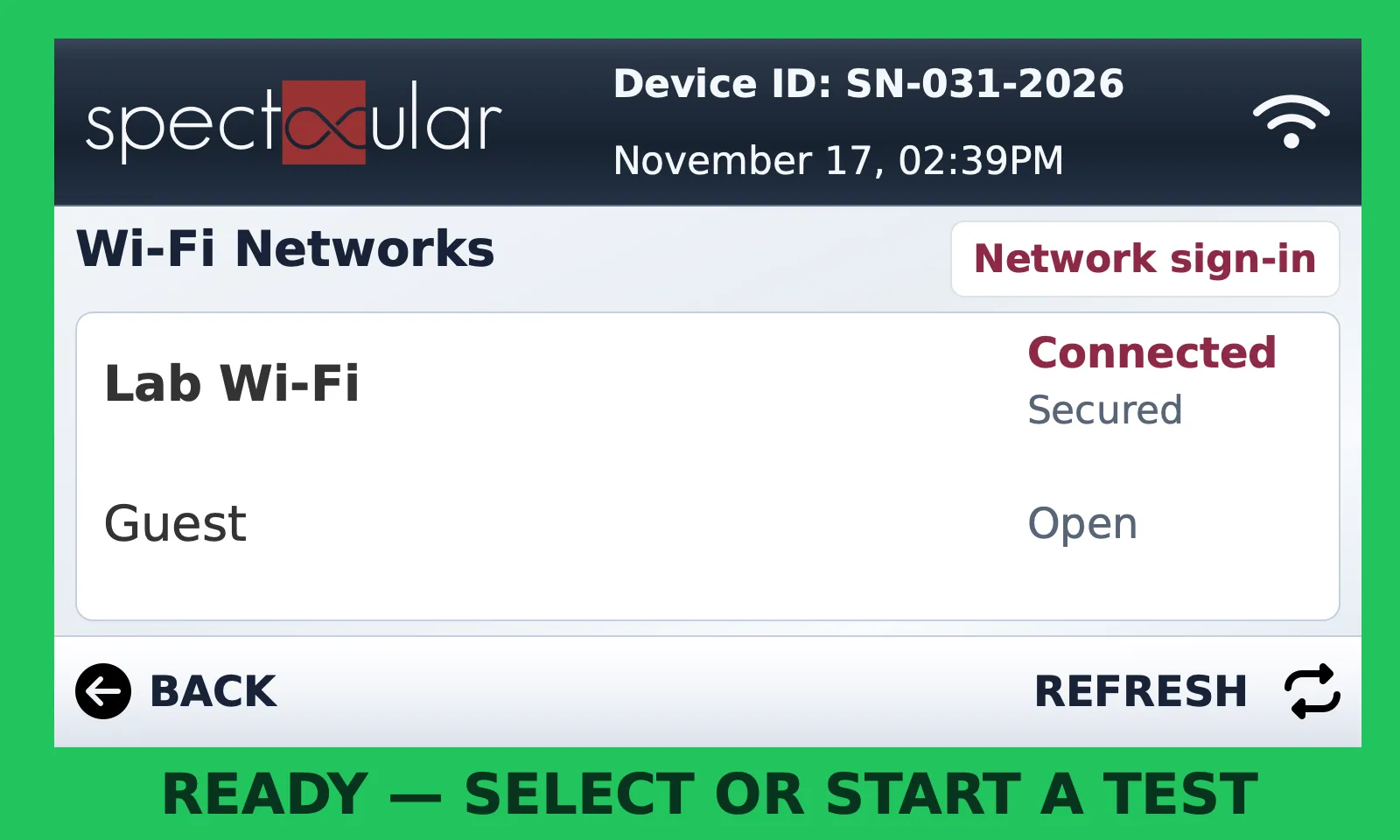
Use these screens to join your site’s Wi-Fi network. Start when the instrument is idle, with the network name and password ready.
Your onboarding path
SpectacularOne is designed for line operators or QA techs — training takes less than 2 hours.
Sign in to SpectacularCloud
Every SpectacularOne device is fully integrated with SpectacularCloud.
Cloud basicsRun your first test
Deposit your sample into a sealed cartridge and load it into the device.
See workflowReview results & CoAs
Results populate live in the dashboard; generate certified CoAs instantly.
Cloud basicsThe touchscreen at a glance
Tap a marker to learn what each part of the main menu does. Instrument screens are shown in English.
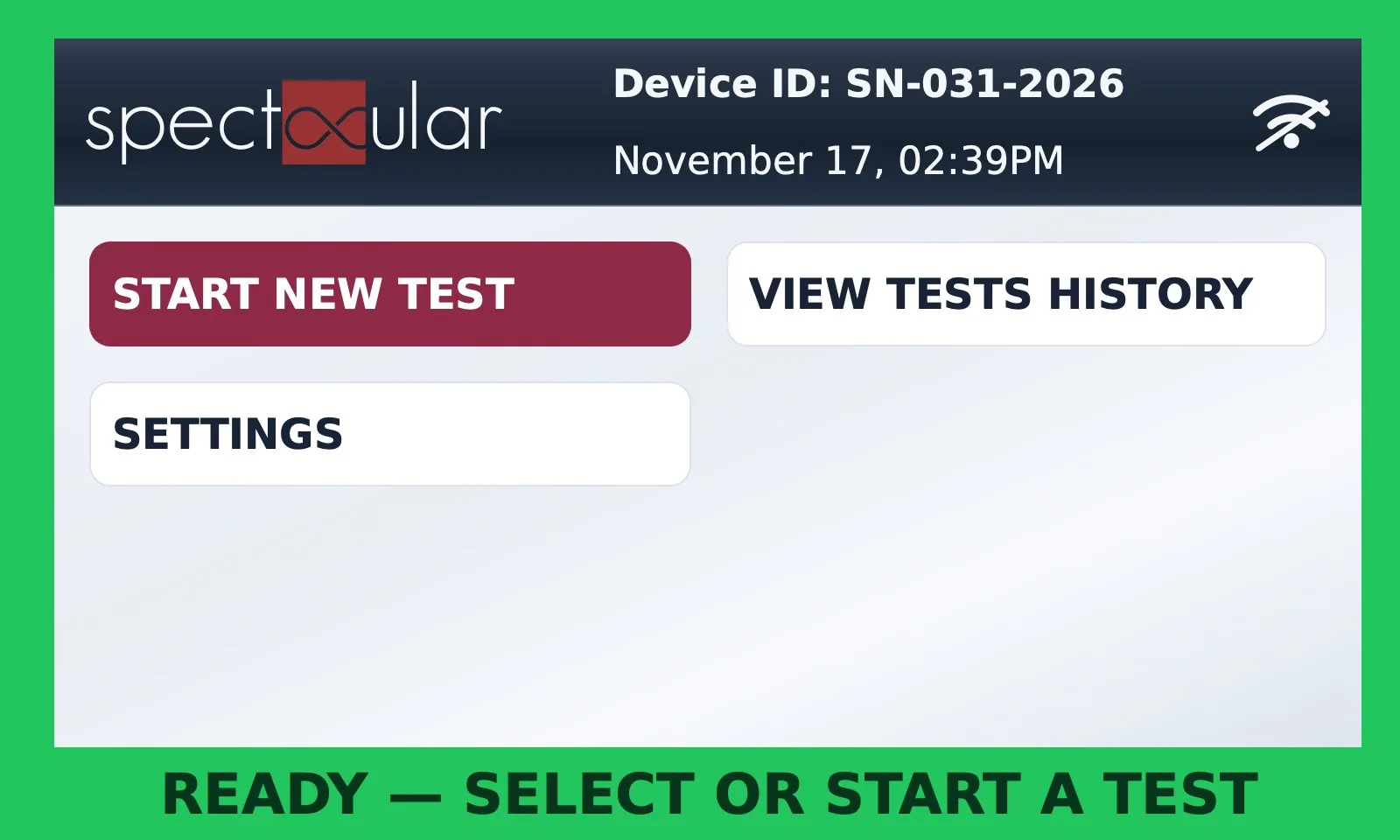
- 1Device IDYour instrument’s serial number. Have it ready when you contact support.
- 2Date & timeCurrent instrument date and time.
- 3Wi-Fi iconStruck through when not connected. Tap it as a shortcut to the network list.
- 4START NEW TESTBegin a new test run.
- 5VIEW TESTS HISTORYReview previous tests on the instrument.
- 6SETTINGSWi-Fi settings, release cartridge and about.
- 7Status barShows the instrument state, e.g. READY — SELECT OR START A TEST.
Run a test
No specialized pipetting required. Certified outcomes appear on the device screen and in SpectacularCloud.

Sample & Cartridge
Deposit your sample (food or environmental) into a fully sealed cartridge. No specialized pipetting required.

Insert into SpectacularOne
Load the cartridge into the device. Internal calibration ensures consistent, reliable readings.

Get Results in Hours
Certified test outcomes appear on the device screen and in SpectacularCloud for instant review.
Cartridges & safety
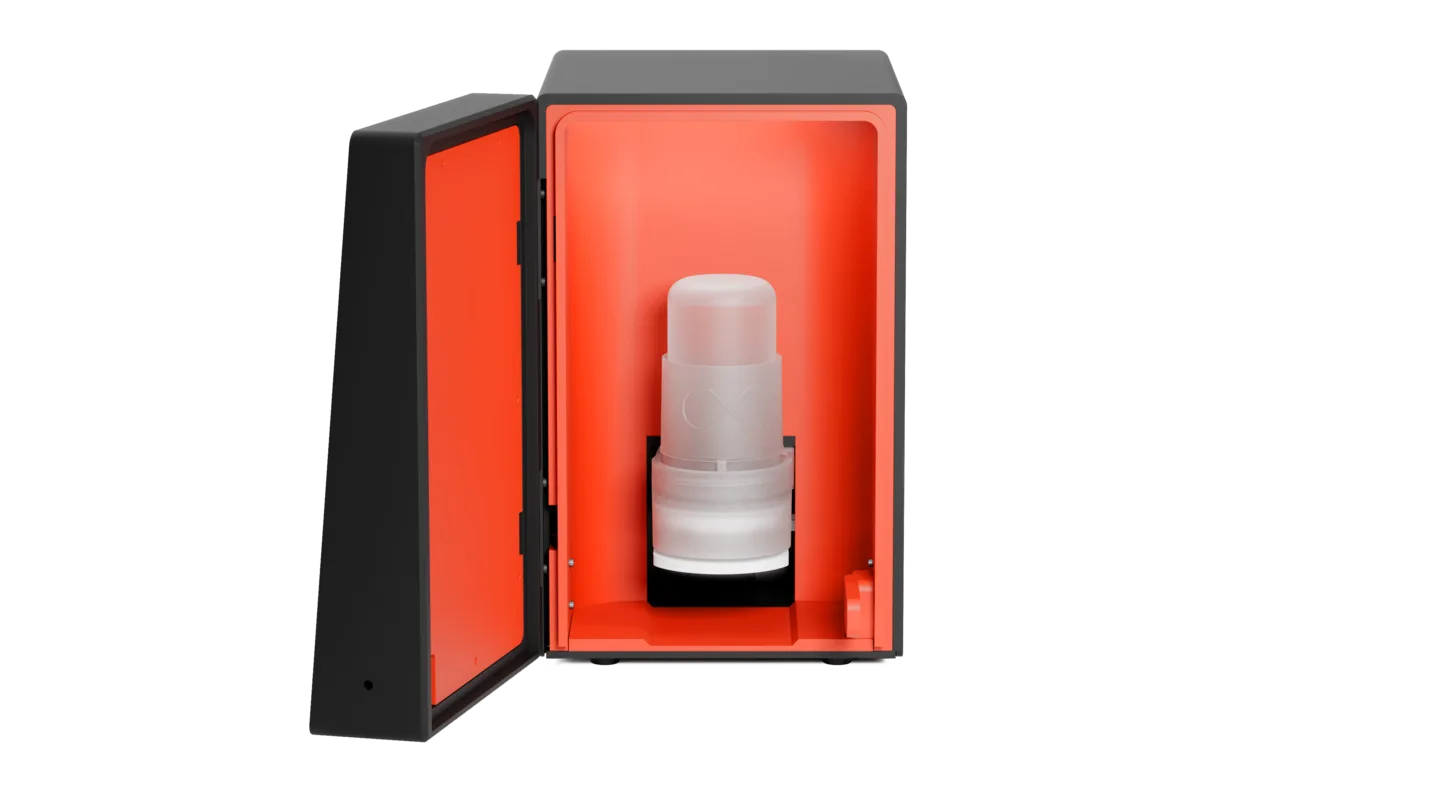
Each cartridge includes enrichment, molecular testing, and certified results (CoA).
- Hermetically Sealed CartridgeDrop-, leak-, and tamper-proof. Sample, reagents, and waste stay locked inside the cartridge at every step.
- Automatic SterilizationBefore the cartridge is ejected, SpectacularOne heat-kills and chemically neutralizes its contents—so nothing hazardous ever leaves the box.
- Room Temperature StableNo refrigeration required. Reagents are stable at room temperature for up to 12 months, eliminating cold chain logistics and storage costs.

SpectacularCloud
The centralized system for test management, compliance tracking, and data analytics. Cloud access is required for all deployments.
- Real-time trackingWatch test results stream in live, with instant notifications across multiple devices.
- CoA on demandGenerate certified Certificates of Analysis instantly — and email one to an auditor instantly.
- Advanced analyticsTrend analysis and customizable dashboards to spot patterns before they become problems.
- API integrationConnect with LIMS, ERP, and existing systems via RESTful APIs.
Compliance & validation
- ISO 17025 AccreditedInternationally recognized quality standard for testing and calibration laboratories.
- HACCP & FSMA CompliantAligned with Hazard Analysis and Critical Control Points and Food Safety Modernization Act requirements.
- AOAC ValidatedOfficial Methods of Analysis validation for rapid pathogen detection methods. (due Q1 2027)
Plans & account
Your device lease includes full warranty coverage, automatic software updates, remote monitoring & support, and maintenance and hardware replacement.
- 12-month minimum lease
- One month deposit required
- 60-day cancellation notice
- Adjust your cartridge plan in the portal any time — surge ordering supported
- Enterprise add-ons: API integration and cellular connectivity
- Volume, batch and multi-site discounts available
Frequently asked questions
Straight answers from our team.
SpectacularOne uses molecular LAMP technology and full enrichment for high sensitivity and specificity; AOAC validation is on track.
No — designed for line operators or QA techs; training takes less than 2 hours.
None — units are self-contained and monitored remotely; issues are flagged or units replaced.
All of the above; users select test type per cartridge.
Yes — adjust in the portal any time; surge ordering supported.
Yes — workflow aligns with FSMA and HACCP hazard-control guidelines.
Email it instantly from SpectacularCloud.
Yes — API integration with LIMS/ERP systems.
Swipe through the list, then tap REFRESH to scan again.
Secured networks need a password. Open networks connect without one.
Yes. Some networks open an extra sign-in page automatically. If needed, tap Network sign-in on the connected list.
No refrigeration required. Reagents are stable at room temperature for up to 12 months.
Downloads
Printable guides to keep beside the instrument.
Still need help?
Our team supports every SpectacularOne deployment — remote monitoring and support are included with your device lease.
- Your Device ID — shown at the top of the touchscreen (e.g. SN-031-2026)
- The message shown in the status bar or on screen
- Your network type: Secured, Open, or web sign-in